

Get your plag & AI score report in 15 minutes. Fast, private Turnitin checks for students with no repository storage. Check similarity & AI scores instantly.

SUMMARY: Students can obtain a Turnitin similarity and AI detection report within 15 minutes through third-party checking services that use the same official Turnitin engine without storing documents in a repository. Standard institutional submissions typically generate reports in 10 to 15 minutes, though a 24-hour delay applies after a fourth resubmission to the same assignment.

Check your essay before you submit. See exactly what your professor sees.
Get the exact same Turnitin report your professor uses. Join 50,000+ students who submitted their essays with confidence this semester.
Similarity scores below 15% are generally acceptable, while scores above 35% typically warrant revision. Turnitin’s AI detection, introduced in 2023, flags content with high predictability patterns associated with tools like ChatGPT, though false positive rates rise for non-native English writers and scores below 20% carry reduced reliability.
Get Your Turnitin Score Report in 15 Minutes Without Repository Storage
Waiting days for a Turnitin score report is not something most students can afford. Deadlines creep up, anxiety builds, and you need answers about your paper now, not tomorrow. The good news is that you can get a Turnitin score report in 15 minutes through the right Turnitin checker for students. At humanfyai.com, we deliver official-grade similarity and AI detection reports fast, without storing your work in any repository. This guide walks you through Turnitin report timing, how the process works, and how to interpret your scores.
How Long Does a Turnitin Report Take to Generate?
The standard Turnitin platform, the one your university probably uses, typically generates similarity reports within 10 to 15 minutes for first-time submissions. This applies to your initial upload and usually your second and third as well. According to Turnitin’s own documentation, uploaded files can take up to 10 to 15 minutes to process and generate a Similarity Report under normal conditions.
So if you have submitted through your school’s portal and the report has not appeared yet, give it a few minutes. Check back after 15 minutes. Most initial reports show up well within that window.
But here is where things get complicated. After your third submission to the same assignment, Turnitin enforces a 24-hour waiting period before generating a new report. This rule exists to prevent the system from matching your new draft against your old one. It is a built-in safeguard, but it catches a lot of students off guard.
At humanfyai.com, we skip that bottleneck entirely. You upload your paper, and your Turnitin scan completes within 15 minutes, every time, regardless of how many drafts you have already checked. No waiting periods, no clock-watching, no missed deadlines.
Does Turnitin Really Take 24 Hours?
This is one of the most common questions students ask, and the answer depends on context. Turnitin does not always take 24 hours. That timeline only kicks in under specific conditions: you are submitting a fourth or subsequent revision to the same assignment slot, your instructor has delayed report release until the due date, or peak season server traffic has slowed processing across the board.
During finals week or midterm season, thousands of students submit simultaneously, and even first-time reports can stretch to several hours. If your report has been pending for more than 24 hours and none of these conditions apply, your file format might be unsupported, your instructor may have restricted access, or there could be a system issue. In those cases, contacting your instructor or Turnitin support is your best move.
Why Is My Turnitin Similarity Report Taking So Long?
Several factors can delay your Turnitin report beyond the typical 15-minute window. Understanding them helps you avoid surprises.
- Resubmission limits: After three submissions, the 24-hour lockout applies automatically
- File size and complexity: Large documents over 10,000 words, or files with dense formatting, tables, and images, take longer to process
- Unsupported formats: Scanned PDFs without selectable text, password-protected files, and certain document types will not process at all
- Instructor settings: Some educators delay report visibility until after the due date or restrict student access entirely
- Server congestion: Peak academic periods create processing queues that can extend wait times significantly
Official Turnitin Documentation: For a comprehensive list of reasons why a report may be delayed, refer to the official support guides: Troubleshooting Similarity Report loading delays and errors.
Turnitin Check: What Your Similarity Score Actually Means
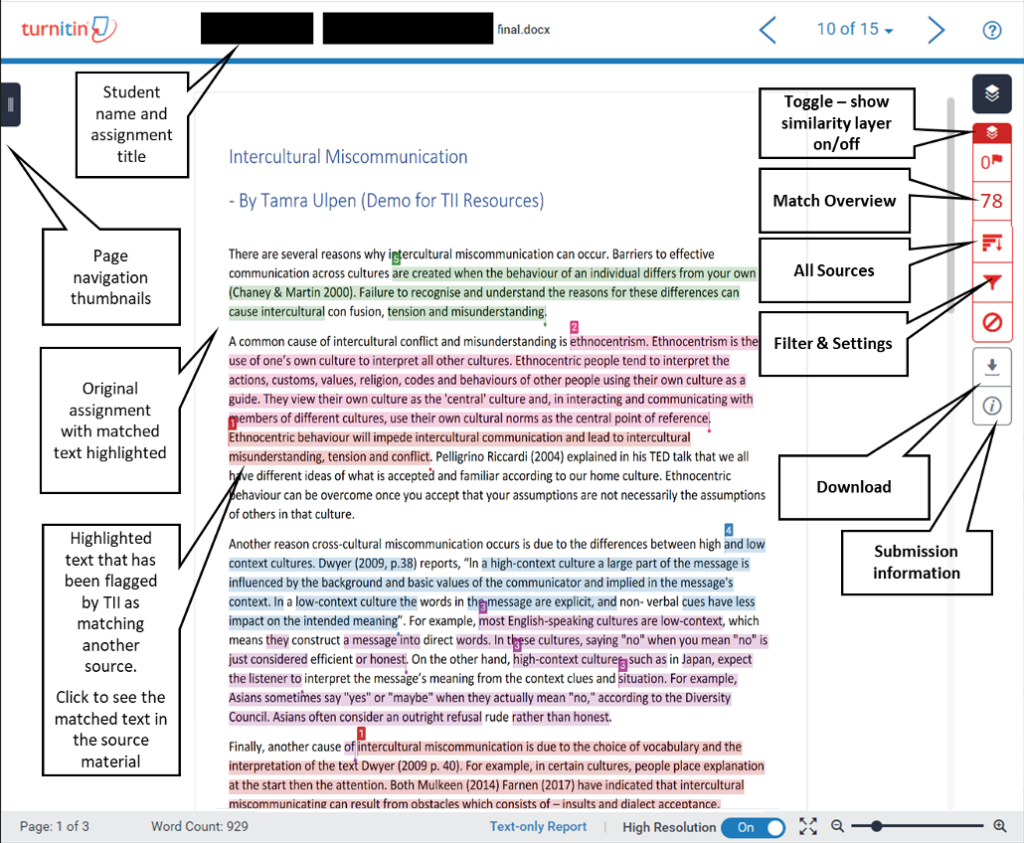
Once your Turnitin check is complete, you get a percentage. This number represents the portion of your text that matches content in Turnitin’s database, which includes internet sources, academic publications, and previously submitted student papers. But here is the thing most students miss: the percentage alone does not tell you if your paper has a problem.
Is 25% on Turnitin Too High?
A 25% similarity score is not automatically bad. It really depends on what is driving that number. If your paper includes properly cited direct quotes, a reference list, and common academic phrases, a score in the mid-twenties can be perfectly acceptable. Many instructors expect some overlap, especially in research-heavy assignments.
However, if a single source contributes most of that 25%, you have a different issue. That pattern suggests your writing leans too heavily on one text, which can look like excessive borrowing even if you cited everything correctly. The key is distribution. Scattered matches across many sources read very differently from concentrated matches against one or two papers.
Context matters too. A literature review will naturally show higher similarity than an original argument paper because you are summarizing and quoting existing scholarship. Always look at the breakdown in your report rather than only the headline number.
Is a 35% Turnitin Score Bad?
At 35%, you are entering territory that most instructors will flag for review. The score itself does not prove plagiarism, but it signals that a significant portion of your text overlaps with existing sources. That warrants attention.
Before you panic, open the full report. Check if the matches come from:
- Your bibliography or reference list, which often matches other papers that cited the same sources
- Quoted material that you enclosed in quotation marks and attributed properly
- Common terminology or template language from your assignment prompt
- Large unquoted passages that closely resemble a single source
The last item is the problematic one. If your report shows long, highlighted sections of body text matching one or two sources without quotation marks, you need to rewrite those sections. Paraphrase in your own words, add your own analysis, and cite the source properly. A score above 35% is absolutely fixable.
What the Colors on Your Report Indicate
Turnitin uses a color system to help you interpret scores at a glance. Blue means no matches found. Gray indicates under 15% similarity. Green covers 15% to 24%. Yellow spans 25% to 34%. Orange covers 35% to 45%. Red means anything above 45%. These colors are visual cues, not verdicts. Yellow or orange demands closer inspection. Red almost certainly requires revision. Gray or green generally means your paper falls within an acceptable range.
Turnitin AI Detection: What Students Need to Know
Turnitin added AI writing detection to its suite of tools in 2023, and Turnitin AI detection has become a major concern for students. The feature scans submissions for patterns associated with ChatGPT, GPT-4, and other large language models. Most universities now run both similarity checks and AI detection on every submission.
Can Turnitin Really Detect ChatGPT?
Yes, Turnitin can detect ChatGPT output, and the accuracy is notably high for unedited AI-generated text. Independent testing in 2024 and 2025 found that Turnitin flagged raw GPT-4 output at rates between 90% and 95%. Turnitin itself claims a 98% accuracy rate for documents containing more than 20% AI-generated text, with a false positive rate below 1%.
That said, detection accuracy varies. Heavily edited AI text, content processed through quality humanization tools, or writing that combines human input with AI assistance often scores much lower. One independent test in 2026 found that raw ChatGPT essays scored 91% AI probability, but after heavy manual rewriting, the same content dropped to 34%. Content processed through dedicated humanization tools fell below 12%.
Turnitin combines three main signals into a percentage score: perplexity (how predictable your word choices are), burstiness (variation in sentence length), and sentence entropy (structural variety across your paper). Most institutions treat a score of 20% or higher as a flag requiring review. Some schools have adopted stricter thresholds, while others, including Vanderbilt University and Northwestern University, have disabled the AI detection feature entirely due to concerns about false positives.
Does Turnitin Detect AI Less Than 20%?
Turnitin does flag content with AI scores below 20%, but the reliability decreases as the percentage drops. Turnitin’s own chief product officer has acknowledged that scores in this range should be interpreted conservatively. The company now places an asterisk next to low-confidence scores to signal reduced reliability.
This matters because false positives are a documented problem. A 2023 study from Stanford’s Human-Centered AI Institute found that AI detectors incorrectly flagged 61% of essays written by non-native English speakers as AI-generated. These students often write with more predictable grammatical patterns, which triggers the same statistical signals that AI detection tools target. If you receive a low AI percentage on your Turnitin scan, your instructor may or may not factor it into their evaluation, depending on institutional policy.
How Many Hours Does Turnitin Take? A Realistic Timeline
Let us put all of this together with a clear breakdown of what to expect when you submit a paper for a Turnitin check.
| Submission Type | Typical Wait Time | Notes |
|---|---|---|
| First submission (standard paper) | 5 to 15 minutes | Fastest processing under normal conditions |
| Second or third resubmission | 5 to 15 minutes | Same slot, immediate processing |
| Fourth or later resubmission | 24 hours | Automatic enforced delay by Turnitin |
| Peak season submissions | 30 minutes to several hours | Midterms, finals, and end-of-term periods |
| Large or complex documents | 15 minutes to 1 hour | Theses, dissertations, and heavily formatted files |
If you need your report faster than these timelines allow, a third-party Turnitin checker for students like humanfyai.com offers the same official Turnitin technology with a guaranteed 15-minute turnaround. Your paper is checked against the same databases, using the same algorithms, but without the submission limits or peak-season delays.
Why Students Use a Private Turnitin Checker
Most students access Turnitin through their university’s learning management system. That works fine until it does not. A private Turnitin checker for students makes sense in several situations: you have exceeded your resubmission limit and face a 24-hour delay, your instructor has disabled student access to reports, you want to check a draft privately before final submission, or you lack institutional access entirely. Many students also want a no-repository check so their draft is not stored and cannot match against itself later.
A private Turnitin scan gives you the same institutional-grade report, including similarity and AI detection scores, delivered as a PDF you can reference while revising.
How the 15-Minute Turnitin Scan Works
The process at humanfyai.com is straightforward. Upload your document in DOCX or PDF format. The system submits it to Turnitin’s official checking engine with the no-repository setting enabled. Within 15 minutes, you receive a complete report showing your similarity percentage, matched sources, and your AI detection score. You can then review each highlighted match and make informed decisions about what to rewrite before your official submission.
How to Read and Act on Your Turnitin Report
Getting the report is only half the battle. You also need to interpret it. Start with the headline similarity percentage. If it falls between 0% and 15%, you are in good shape. Between 15% and 25%, review the matches to confirm they are properly cited quotes and references. Above 25%, dig deeper and plan revisions.
Click into each matched source and look for concentration. One source accounting for a large chunk of your percentage is a red flag. Many small matches from varied sources is normal. Pay special attention to matches in your introduction and conclusion.
If your report includes an AI score, a result above 50% strongly suggests AI involvement. Between 20% and 50%, the signal is present but not definitive. Below 20%, confidence drops. False positives exist, especially for non-native English writers. Rewrite high-match sections in your body text, add your own voice, and vary sentence structure if your AI score is high. Then run a new Turnitin scan to confirm your changes worked.
Tips for Keeping Your Scores Low
- Cite as you write, not after. Inserting citations during drafting prevents accidental uncredited borrowing
- Paraphrase structurally, rather than only by swapping synonyms. Change sentence architecture and add your own interpretation
- Limit direct quotes to under 10% of your total word count
- Run a private Turnitin check before your official submission to catch issues early
- Avoid last-minute submissions, which leave no buffer for revisions
- Write in your own voice. Your natural analytical style is your best defense against similarity flags and AI detection
Final Thoughts
Getting a Turnitin score report in 15 minutes is not a fantasy. It is what happens when you use a dedicated Turnitin checker for students that prioritizes speed, privacy, and accuracy over institutional gatekeeping. You do not need to wait 24 hours for a fourth resubmission. You do not need to wonder if your instructor will share the report with you. You upload your paper, you get your results, and you fix what needs fixing.
At humanfyai.com, we built our service around the reality of student deadlines. Our no-repository Turnitin scans give you the same report your professor sees, delivered in 15 minutes, with zero risk of your draft being stored or matched against itself later. If you need a quick similarity check, an AI detection scan, or both before a tight deadline, you have a faster option than waiting on your school’s system.
Submit smart. Check early. Revise with confidence.
Worried about plagiarism scores or AI detection flags? Get the exact same plagiarism & AI report your professor sees in 15-20 minutes. Trusted by thousands of students, researchers, institutions, and agencies.