

Find the 5 best reliable plagiarism check tools for college essays. Compare Turnitin, Scribbr, Grammarly, Drillbit, and Quetext to find the right checker for your academic needs.
SUMMARY: Five plagiarism detection tools for college students are compared based on database coverage, accessibility, and cost. Turnitin remains the most widely used institutional tool, while Scribbr provides access to the same database without a university login. Grammarly Premium, Drillbit, and Quetext serve different needs based on budget and use case.

Check your essay before you submit. See exactly what your professor sees.
Get the exact same Turnitin report your professor uses. Join 50,000+ students who submitted their essays with confidence this semester.
Similarity scores are contextualized beyond raw percentages, noting that properly cited quotes and common phrases contribute to matches. The piece also addresses Turnitin’s AI detection capabilities and clarifies that grammar tools like Grammarly do not leave detectable traces in submitted work.
The 5 Best Reliable Plagiarism Check Tools for College Essays
Submitting an original college essay matters more now than ever. With professors running every paper through a Turnitin check, getting caught with plagiarized content can mean a failing grade or academic probation. The right plagiarism checker lets you fix citations, rewrite sloppy paraphrases, and submit work you actually feel confident about.
Not all detectors work the same way though. Some check against massive academic databases while others only scan web content and miss journal articles entirely. If you want to know what is the best plagiarism checker for college, you need to understand what each tool compares your paper against. Here are five options that deliver real results.
1. Turnitin: What Most Colleges Actually Use
If you have ever wondered what plagiarism checker do most colleges use, the answer is Turnitin. Over 15,000 educational institutions worldwide rely on it. Turnitin scans submissions against more than 99 billion current and archived web pages, over 90,000 academic journals, and 160 million student papers from previous semesters.
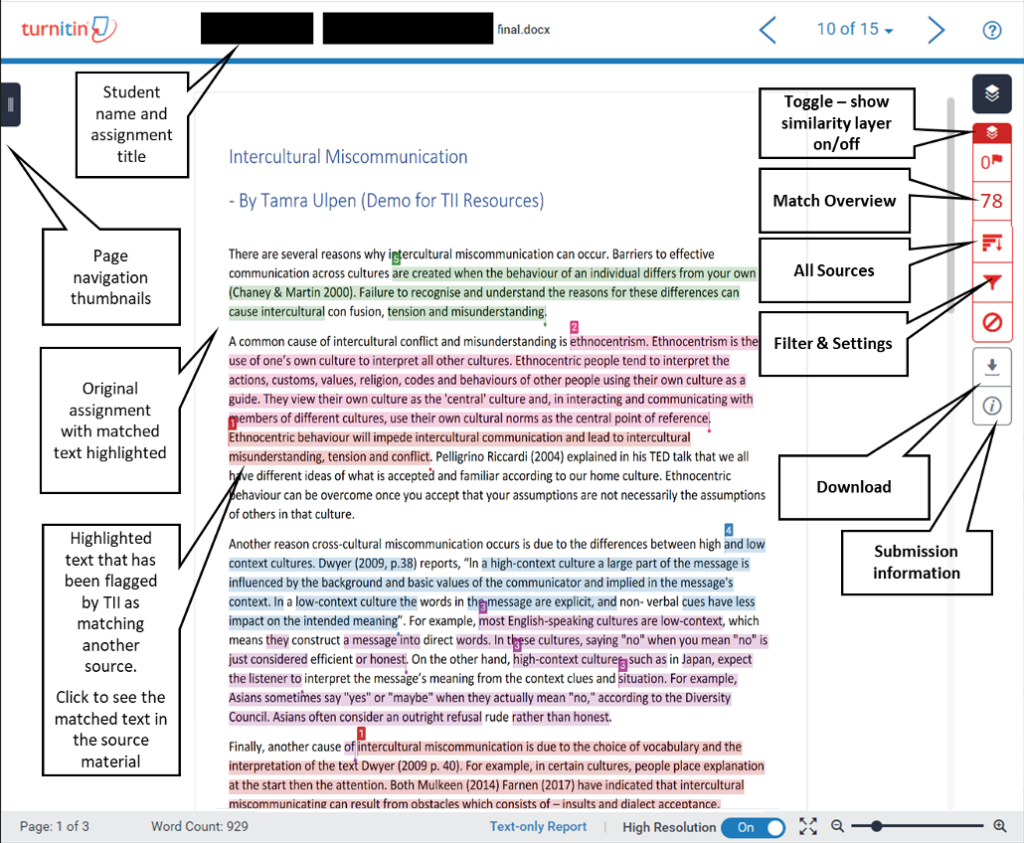
For students, Turnitin works through your school’s learning management system. You upload your draft, and the software generates a similarity report with color-coded highlights showing exactly which sentences match existing sources. The platform also includes Turnitin AI detection capabilities that flag text generated by ChatGPT, GPT-4, and Google Gemini. If you are asking “can Turnitin actually detect ChatGPT,” the answer is yes. Raw AI output gets flagged reliably, though heavily edited human-AI hybrid text is harder to catch.
The downside is that Turnitin for students requires institutional access. You cannot buy an individual subscription, so if your school does not provide access you will need an alternative.
2. Scribbr: Turnitin Power Without the Login Wall
Scribbr offers the same database as Turnitin without requiring a university login. This makes it one of the best options for students who need a serious Turnitin scan but lack institutional access. The checker compares your paper against Turnitin’s full database of academic journals, student papers, and web content.
Scribbr works on a pay-per-document model. You upload your file, pay based on word count, and get a detailed similarity report in about 10 minutes. The report highlights matching text, links directly to sources, and includes a plagiarism percentage. Best of all, Scribbr promises your paper never gets added to any database, so future submissions of your own work will not trigger false matches. Pricing starts at $19.95 for papers under 7,500 words. That is not free, but the accuracy justifies the cost for high-stakes submissions.
3. Grammarly Premium: Writing Help Plus Plagiarism Detection
Grammarly Premium includes a built-in plagiarism checker that scans your text against 16 billion web pages and ProQuest academic databases. It flags unoriginal content and suggests proper citations in MLA, APA, or Chicago format.
So which is better, Turnitin or Grammarly? It depends on your needs. Turnitin has a deeper academic database and catches more forms of paraphrased plagiarism. Grammarly offers a smoother writing experience with real-time grammar, clarity, and tone suggestions alongside the plagiarism check. For an all-in-one editing tool, Grammarly works well. For final pre-submission checks on major papers, Turnitin or Scribbr provide stronger detection.
Some students worry: “Can Turnitin detect if I used Grammarly?” No. Grammarly’s grammar suggestions and minor rewrites do not trigger plagiarism or AI detectors. Using it for grammar checking and style suggestions is acceptable at virtually every college. However, Grammarly’s newer generative AI features could leave traces if you rely heavily on them to rewrite entire paragraphs. Stick to the core grammar and plagiarism features and you will stay on safe ground.
4. Drillbit: The Budget-Friendly Alternative
When comparing Turnitin vs Drillbit, each serves different needs. Drillbit is a cloud-based detector popular in India and Southeast Asia that uses AI algorithms to detect verbatim copying, partial paraphrasing, and cross-language similarities. The interface is clean, results come back fast, and pricing is significantly lower than Turnitin.
Drillbit supports multiple languages and works with PDFs, Word documents, and plain text. That said, its academic database is smaller than Turnitin’s. For research-heavy theses, Turnitin or Scribbr will catch more issues. For standard college essays, Drillbit performs reliably at a lower cost.
5. Quetext: Deep Search with Citation Support
Quetext uses DeepSearch technology that detects exact matches plus fuzzy and near-match similarities. The ColorGrade feedback system shows which sources your text resembles and how closely it aligns. Quetext also includes a built-in citation generator to fix missing attributions on the spot.
The free plan checks up to 500 words monthly. Paid plans start at $4.16 per month billed annually and allow up to 100,000 words per scan. Quetext runs entirely in your browser with no software to install, making it a solid middle-ground option: more thorough than basic free checkers, more affordable than Scribbr, and easier to access than Turnitin.
Understanding Your Similarity Score
After running a Turnitin check, you will see a similarity percentage. Many students panic above 15%, but context matters more than the raw number. A common question is: “Is 25% on Turnitin too high?” The honest answer is that it depends. That 25% includes properly cited quotations, your reference list, common academic phrases, and standard terminology. Many well-researched papers score between 15% and 25%.
What actually raises red flags are long blocks of matching text without citations, repeated matches to a single source, and poorly paraphrased passages that stay too close to the original wording. Focus on those patterns rather than chasing an arbitrary low percentage.
Turnitin AI Detection: What You Should Know
Beyond plagiarism, many students now ask about AI detection. “Can Turnitin detect ChatGPT grammar check outputs?” If you use ChatGPT to rewrite or generate entire sections, Turnitin will likely flag that text. Its AI detection model looks for predictable sentence structures and uniform word choices that differ from natural human writing.
Another concern: “Can a professor tell if you use Grammarly?” Professors can tell when writing has been polished, but Grammarly itself does not leave detectable traces. Using it to catch typos and improve clarity is standard practice. What professors notice are sudden shifts in writing quality or voice within a single paper. Those inconsistencies suggest outside help.
If you want to know which app is better than Turnitin for AI detection specifically, Originality.ai specializes in identifying AI-generated text. For combined plagiarism and AI checking in academics though, Turnitin remains the most trusted solution.
Quick Comparison: Picking the Right Tool
| Your Situation | Best Tool | Why |
|---|---|---|
| Your school provides Turnitin access | Turnitin | Same database your professor uses |
| No institutional access, final paper check | Scribbr | Full Turnitin database, pay-per-use |
| Grammar help plus plagiarism scanning | Grammarly Premium | All-in-one writing and checking |
| Tight budget, standard college essays | Drillbit | Affordable, fast, multi-language |
| Browser-based, occasional checks | Quetext | Free tier available, easy to use |
Final Thoughts
Running a plagiarism check before submitting your college essay is one of the smartest habits you can build. It catches accidental copying, helps you fix citation errors, and gives you confidence that your work holds up under your professor’s review. Turnitin leads academics for good reason, but Scribbr, Grammarly, Drillbit, and Quetext all deliver real value when matched to the right situation. Pick the tool that fits your access level, run your paper through it, and submit knowing you did the work properly.
Official Turnitin Documentation:
For a deeper understanding of how Turnitin processes submissions and interprets similarity scores, refer to the official support guides: Turnitin Help Center and Similarity Report resources.
Worried about plagiarism scores or AI detection flags? Get the exact same plagiarism & AI report your professor sees in 15-20 minutes. Trusted by thousands of students, researchers, institutions, and agencies.