

Want to check Turnitin without submitting? Learn the only official pre-submission methods plus trusted alternatives for students without access.
How to Check Turnitin Without Submitting: What Actually Works
You have a deadline approaching and you want to check your paper before committing to the final upload. Learning how to check Turnitin without submitting is one of the most common concerns for students, and the instinct behind it is solid. Catching a high similarity score early gives you time to fix citation errors, rephrase overloaded quotes, and submit with confidence. The problem is that Turnitin does not work like a public tool. You cannot simply visit a website, create a free account, upload your essay, and receive a similarity report in seconds.

Check your essay before you submit. See exactly what your professor sees.
Get the exact same Turnitin report your professor uses. Join 50,000+ students who submitted their essays with confidence this semester.
Turnitin operates on an institutional licensing model. Schools and universities pay for annual access, and students log in through that system, usually via a learning management platform like Canvas, Blackboard, or Moodle. Individual students cannot purchase their own Turnitin accounts. This reality catches many people off guard, especially exchange students, online learners, or anyone whose campus credentials have not been fully synced with the institutional directory.
If you have ever tried to sign up independently, you already know how frustrating this can be. The good news is that one official workaround exists, and several reliable alternatives can give you similar results. This guide walks you through the only legitimate pre-submission method, what to do if your school does not offer it, and how to interpret your results without unnecessary stress.
Why Turnitin for Students Requires Institutional Access
Turnitin explicitly states that it does not offer individual license purchases. If your college does not have an active contract, you cannot buy your way in. Access flows from the institution to the student through an LMS integration. Some instructors configure assignments to allow multiple draft submissions. In those cases, you can upload a rough version, view the similarity report, revise your work, and resubmit before the deadline. Other instructors disable student report viewing entirely, which leaves you completely in the dark until after grading.
This setup creates a frustrating gap. Students want a Turnitin scan before the point of no return, but the platform fundamentally revolves around final submission, not casual previewing. That structural limitation is exactly why Draft Coach exists.
Using Turnitin Draft Coach to Preview Your Score
Turnitin Draft Coach is the only official tool that lets you run a similarity check before submitting your final paper. It functions as an add-in inside Microsoft Word Online, and some institutions also support it within Google Docs. Draft Coach compares your text against Turnitin’s full database of web pages, academic journals, and previously submitted student papers. The critical detail here is that Turnitin does not store your document in its repository during a Draft Coach check. Running an early similarity report will not cause your final submission to match against itself later, which would artificially inflate your score and create unnecessary problems with your instructor.
You get up to three similarity checks per document, plus unlimited grammar and citation feedback. The similarity check requires a minimum of twenty words to run, and processing usually takes a few minutes depending on document length. Once the report generates, you will see a percentage score and highlighted matching text directly inside your document. Clicking any match reveals the specific source, so you can review your citations and decide what needs reworking before you finalize anything.
Draft Coach only works through your university’s Microsoft 365 or Google Workspace account because your institution must enable the integration first. It will not function in the desktop version of Word that you installed locally on your computer, so do not waste time trying to find it there.
How to Set Up Draft Coach in Word Online
Getting started takes about five minutes:
- Open Microsoft Word Online through your school’s Office 365 portal and load the document you want to check.
- Click Insert in the ribbon menu, then select Add-ins.
- Search for “Turnitin Draft Coach” in the Office Add-ins store.
- Click Add, then accept the permissions and terms of use.
- Select the Turnitin tab from your toolbar and click Draft Coach.
- Click Get Feedback Now, then choose Similarity Check.
- Click Run Similarity Check and confirm. Wait for the report to finish.
If you burn through all three checks and need additional ones, copy your text into a new Word document. That resets the counter. For detailed instructions from Turnitin directly, refer to their official setup guide: Adding Draft Coach to Microsoft Word Online.
What If You Cannot Access Draft Coach
Not every student has institutional access to Word Online or Google Workspace. Some schools have not enabled the Draft Coach integration. Others rely on entirely different systems that do not support add-ins. If you cannot use Draft Coach, you need an alternative that mimics what a genuine Turnitin check actually does.
Third-party tools like humanfyai.com fill this gap by offering AI-powered plagiarism scanning. These platforms analyze your text against large databases and flag potential similarities, giving you a chance to clean up your work before the official submission. When evaluating alternatives, prioritize tools that meet three criteria:
- They do not store your draft in a searchable database where future checks could flag it.
- They provide a clear similarity percentage with a detailed source breakdown.
- They include AI detection capabilities, since Turnitin now scans for AI-generated content alongside traditional plagiarism.
A quality alternative should give you the same core benefit: a preview of potential problems while you still have time to fix them.
How to Read Your Similarity Report
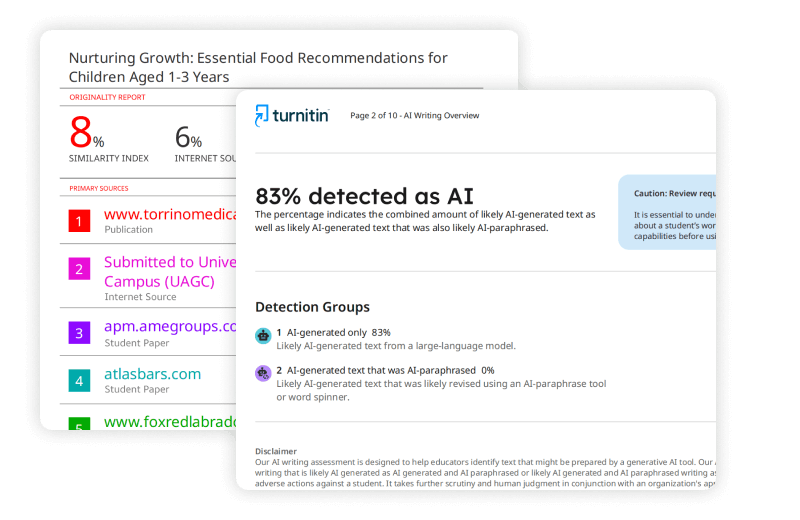
A high similarity score does not automatically mean you plagiarized. The number tells you what percentage of your text matches something in Turnitin’s database. A well-researched paper with proper citations often shows 15% to 25% similarity because of direct quotes and reference lists. Conversely, a paper sitting at 5% might still contain a single uncited paragraph copied directly from a source, which represents a much bigger academic integrity issue than twenty properly attributed quotations.
When you review your report, examine the source breakdown carefully. Matches coming from your bibliography or standard phrases are completely normal. Long, uninterrupted blocks of highlighted text from a single source you never actually read deserve your full attention. Turnitin uses a color-coded system to help you spot these patterns. Blue means Turnitin found no matches. Green indicates up to 24% matching text. Yellow falls between 25% and 49%. Orange hits 50% to 74%. Red means 75% or higher.
Focus on the quality of matches, not just the number. Instructors look at context, not percentages alone.
Practical Takeaways
- Turnitin does not sell individual accounts. Access comes only through your school or university.
- Turnitin Draft Coach in Word Online is the only official way to run a Turnitin scan before final submission.
- Draft Coach gives three similarity checks per document and does not add your paper to Turnitin’s repository.
- Students without institutional access can use reputable alternatives like humanfyai.com to preview similarity and Turnitin AI detection risk.
- A similarity score is a signal, not a final verdict. Always inspect the source details before making changes.
Official Turnitin Documentation:
For confirmation that individual licenses are not available to students, refer to Turnitin’s official support page: How can I buy a Turnitin subscription license for myself.
Worried about plagiarism scores or AI detection flags? Get the exact same plagiarism & AI report your professor sees in 15-20 minutes. Trusted by thousands of students, researchers, institutions, and agencies.