

Learn how to write Turnitin-ready content that passes plagiarism checks and AI detection. Practical tips for students to create original, authentic academic work.

SUMMARY: Turnitin evaluates student submissions through two separate checks: a similarity report that compares text against a database of published and previously submitted work, and an AI detection report that identifies machine-generated writing patterns such as predictable word choices and uniform sentence structure. AI-generated text does not appear as plagiarism in the traditional sense but is flagged separately.

Check your essay before you submit. See exactly what your professor sees.
Get the exact same Turnitin report your professor uses. Join 50,000+ students who submitted their essays with confidence this semester.
Producing work that passes both checks relies on writing in a genuine personal voice, varying sentence structure, citing all sources correctly, and incorporating personal analysis or examples that AI cannot replicate. Using AI tools only for brainstorming or outlining, rather than submitting their output directly, is also advised. Running a draft through Turnitin before the final deadline allows students to identify and revise flagged sections in advance.
How to Write Turnitin-Ready Content that Passes Both Plagiarism and AI Scans
If you are a student, you have probably worried about running a Turnitin check before submitting an assignment. Turnitin has become the standard tool universities use to scan papers for both copied content and AI-generated text. The good news? Writing content that passes both checks is not complicated once you understand how the system works.
This guide breaks down exactly what a Turnitin scan looks for, how its AI detection functions, and what you can do to produce work that is genuinely yours. No tricks, no shortcuts. Just solid writing habits that keep your academic record clean.
What Turnitin Actually Checks For
Turnitin runs two separate checks on every submission. The first is the similarity report, which compares your writing against a massive database of published papers, websites, and previously submitted student work. The second is the Turnitin AI detection report, which analyzes your text for patterns commonly found in machine-generated content.
How Turnitin Scans for Plagiarism
When you submit a paper, Turnitin breaks it into small chunks and compares those chunks against its database. It highlights any matching text and gives you a similarity percentage. A high score does not always mean you plagiarized. Direct quotes, common phrases, and properly cited material can all trigger matches. The key is keeping your similarity score within acceptable limits, usually under 15-20% for most institutions.
How Turnitin AI Detection Works
Turnitin AI detection uses a machine learning model trained on millions of human-written and AI-generated texts. It looks at four main things: perplexity (how predictable your word choices are), burstiness (how much your sentence length varies), repetitiveness (overused phrases and transitions), and how generic or detached the writing feels. Human writing tends to be messier, less predictable, and more varied in rhythm. AI writing, by contrast, often sounds polished in a way that feels oddly uniform.
Does AI Show Up as Plagiarism on Turnitin?
This is a common point of confusion. AI-generated text does not typically show up as plagiarism in the traditional sense, because the words are original. They were not copied from an existing source. However, Turnitin flags AI content in its separate AI writing report. So while your similarity score might look clean, your AI score could raise red flags. Both reports matter, and both can affect your grade or trigger an academic integrity review.
How to Write Content That Passes a Turnitin Check
Now that you know what Turnitin looks for, here is how to write in a way that keeps both scores low and your credibility intact.
Write in Your Own Voice From the Start
The biggest mistake students make is trying to sound overly formal or academic. They reach for big words, complex sentence structures, and stiff transitions because they think that is what professors want. Ironically, that is exactly the kind of writing that triggers AI detectors.
Instead, write the way you think. Use contractions if they feel natural. Start some sentences with short, direct statements. Let others run longer with clauses that build on an idea. Your writing should sound like a real person explaining something they understand, not a textbook regurgitating facts.
Vary Your Sentence Structure
AI tools tend to write sentences that are roughly the same length. They follow predictable patterns. Subject, verb, object. Transition word, supporting point, conclusion. Over and over. Human writers do not do this. We write short fragments for emphasis. We follow them with longer sentences that develop a thought. Sometimes we use questions. Sometimes we stack clauses.
To pass a Turnitin scan, mix it up. A one-word sentence can pack a punch when placed after a complex paragraph. A long, winding sentence can add depth when surrounded by shorter ones. Read your work aloud. If it sounds robotic, rewrite it.
Cite Every Source Properly
This seems obvious, but poor citation habits are one of the fastest ways to tank your similarity score. Any time you use someone else’s idea, quote, or data, cite it. Use the citation style your instructor requires, and double-check your reference list for accuracy. Turnitin for students works best when you give it properly formatted citations to exclude from the similarity check.
Can Turnitin Detect AI After Paraphrasing?
Yes, and this surprises a lot of students. Running AI-generated text through a paraphrasing tool like QuillBot does not make it undetectable. Turnitin’s model has been trained to recognize AI-paraphrased content specifically. It looks for the same underlying patterns, even when the words have changed.
In fact, paraphrasing AI text can sometimes make the detection score worse. The resulting text often has an unnatural cadence, awkward word choices, and the same structural uniformity as the original. If you are going to use AI as a starting point, rewrite the content completely in your own words rather than relying on automated paraphrasing tools.
Can I Humanize AI Text in Turnitin?
You cannot “humanize” text inside Turnitin itself. Turnitin is a detection tool, not an editor. But you can humanize AI-drafted content before you submit it, and that makes a real difference.
Use AI as a Drafting Tool, Not a Final Copy
If your institution allows AI assistance, treat it like a research assistant or brainstorming partner. Ask it for an outline. Use it to generate source ideas. But never copy and paste its output directly into your submission. Take the concepts, find your own sources, and write the final version yourself.
Add Personal Examples and Analysis
AI cannot include personal experiences, specific observations from your life, or insights from your coursework. That is your advantage. Add examples from your own studies, reference discussions from class, or include observations from labs, internships, or fieldwork. This kind of content is unmistakably human and adds value that no AI can replicate.
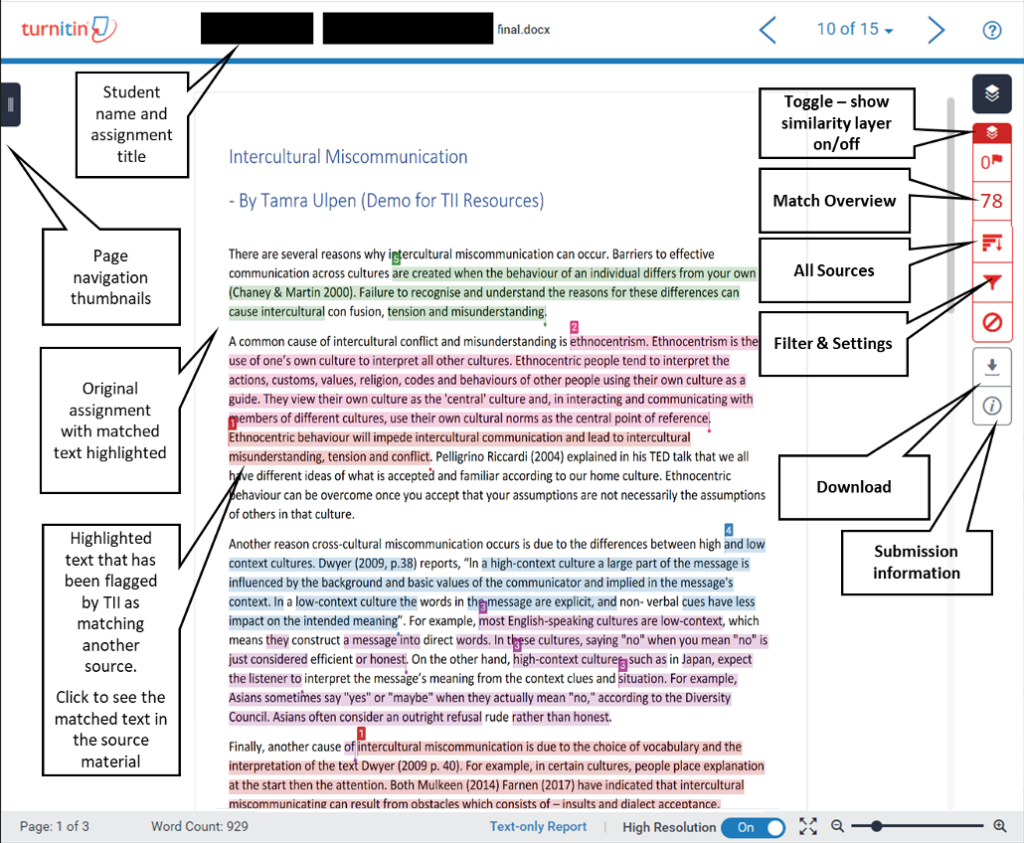
How to Use Turnitin to Detect AI and Plagiarism
Many students have access to Turnitin for students through their university’s learning management system, such as Canvas or Blackboard. If yours does, use it before your final deadline. Submit a draft and review both the similarity report and the AI detection score. Look at which sections are flagged and ask yourself why.
If a section is highlighted for similarity, check your citations. If it is flagged as AI-generated, read it aloud. Does it sound like something you would actually say? If not, rewrite it. This pre-submission check is one of the most effective tools you have for catching problems before they cost you points.
Quick Checklist Before You Submit
Run through this list before every submission to keep your work clean:
• Read the assignment prompt and write your response without copying any source text verbatim.
• Cite all quotes, paraphrases, and data using the required citation style.
• Vary your sentence length and structure throughout the paper.
• Include personal analysis, examples, or insights that reflect your own understanding.
• Run your paper through Turnitin if your institution offers pre-submission checks.
• Review any flagged sections and revise them before the final deadline.
Final Thoughts
Writing Turnitin-ready content comes down to one principle: do your own work in your own voice. The detection tools are sophisticated, but they are not mysterious. They look for patterns that separate authentic human writing from copied or machine-generated text. When you write with clarity, cite your sources, and inject your own perspective into every paragraph, you give yourself the best chance of passing both checks with confidence.
Need more guidance on how Turnitin processes submissions? Refer to the official Turnitin support documentation on AI writing detection capabilities and file requirements for detailed, up-to-date information straight from the source.
Official Turnitin Documentation:
Turnitin AI Writing Detection Model – Official Documentation
Worried about plagiarism scores or AI detection flags? Get the exact same plagiarism & AI report your professor sees in 15-20 minutes. Trusted by thousands of students, researchers, institutions, and agencies.