

Learn how to interpret your Turnitin similarity report, understand what your percentage score really means, and fix high similarity matches in your assignments.
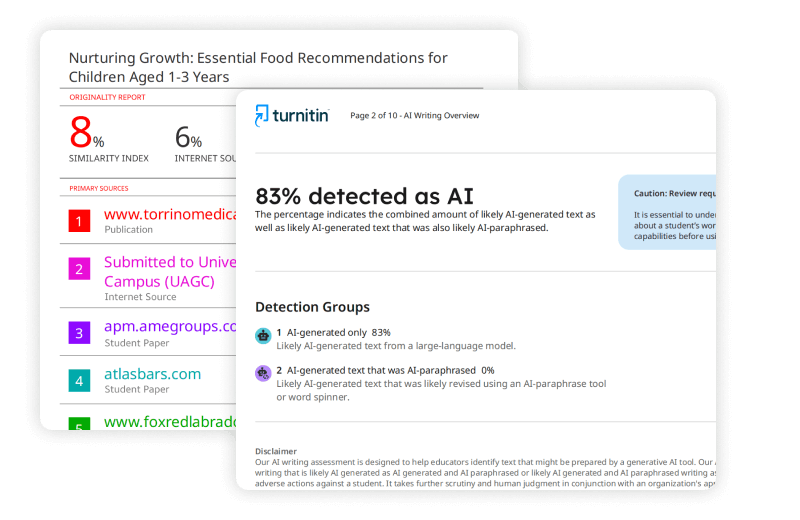
SUMMARY: Turnitin generates a similarity report by comparing submitted text against a large database of academic and online sources, highlighting matching passages. The resulting percentage score reflects how much text overlaps with existing sources, not a direct measure of plagiarism, which requires human judgment.

Check your essay before you submit. See exactly what your professor sees.
Get the exact same Turnitin report your professor uses. Join 50,000+ students who submitted their essays with confidence this semester.
Scores vary in significance depending on context, citation practices, and institutional guidelines. Filters, color-coded indicators, and match-level inspection help users distinguish between properly cited content and passages that may need revision or improved paraphrasing.
Understanding your Turnitin similarity report is a standard part of modern academic life. You submit your paper, wait for the processing to finish, and then get a percentage score. It is easy to panic if that number is higher than you expected, but the report is not just a grade or a verdict on your integrity. It is a diagnostic tool meant to help you improve your writing.
What is a Turnitin Check?
A Turnitin check is an automated process that compares your submitted text against a massive database of academic papers, journals, books, and internet content. It generates a similarity report highlighting sections of your writing that match other sources.
When you use Turnitin for students, remember the tool does not identify plagiarism on its own. It only identifies matching text. It is up to you, your instructor, and the institutional guidelines to determine if those matches are problematic.
Interpreting Similarity Percentages
Students often worry about specific numbers. You might find yourself asking if a certain percentage is acceptable. There is no universal “passing” or “failing” percentage. A score represents the total amount of text in your paper that matches other documents.
- Is 5% similarity a good score? Generally, yes. It suggests your work is largely original.
- Is 18% or 22% or 24% similarity okay? Often, these scores are perfectly acceptable, especially if you have used many quotes and references.
- What about 25%, 27%, or 29%? These scores fall into the yellow category. They are common in papers that contain significant quotations or bibliographies. They usually require a closer look to ensure proper citation.
- Is 40% or 51% too high? These scores are more likely to flag for review. They may indicate poor paraphrasing, excessive reliance on other sources, or missing citations.
Does Turnitin Scan for AI?
Yes, Turnitin scan technology now includes AI writing detection. This feature flags text that exhibits patterns common to language models like ChatGPT. If you use AI to draft your work, Turnitin may highlight those portions. As with the similarity report, AI detection serves as an indicator for human review rather than a final judgment.
How to Read Your Report Properly
To use your report effectively, follow these steps:
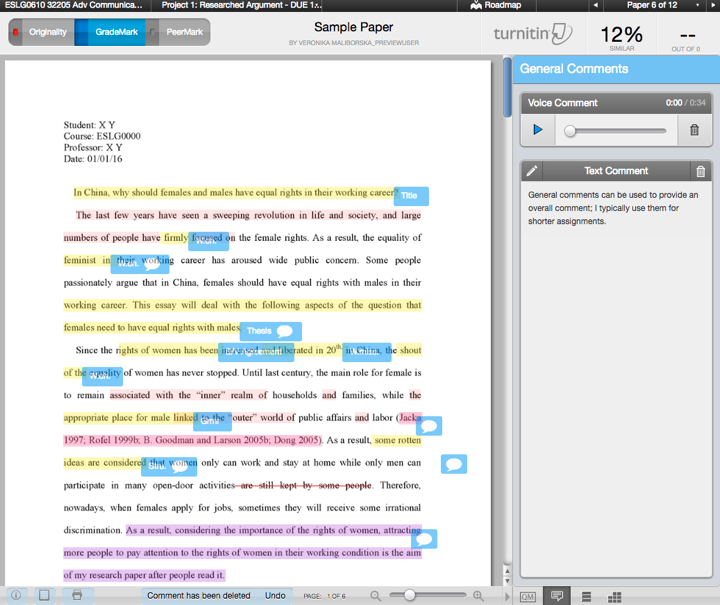
- View the Match Overview: Click the similarity score to see a breakdown of sources. This tells you exactly where the matched text came from.
- Use Filters: You can often exclude your bibliography or direct quotes from the results. This action frequently lowers your similarity score significantly and provides a more accurate view of your original writing.
- Inspect Individual Matches: Do not look only at the total percentage. Click on specific highlights. If the highlighted text is a common phrase or a properly cited quotation, it is rarely an issue. If the highlighted text consists of entire paragraphs without attribution, you have work to do.
- Check Context: Sometimes, a high score happens because you used a standard template or common research questions provided by your professor. These matches are expected.
What the Colors Mean
Turnitin uses a color-coding system to help you quickly identify the level of similarity:
- Blue: No matching text (0%).
- Green: One word to 24% matching text.
- Yellow: 25% to 49% matching text.
- Orange: 50% to 74% matching text.
- Red: 75% to 100% matching text.
These colors provide a quick visual guide, but they do not replace reading the actual document. A red score might look alarming, but if that 80% similarity consists of a lengthy, correctly cited appendix, your actual writing might be perfectly fine.
Handling High Similarity Results
If you find yourself with a high similarity score, remain calm. Start by filtering out the bibliography and small matches. If the score drops significantly, your citations are likely correct.
If the score remains high, read the flagged sections. Are you quoting too much? Are your paraphrases too close to the original source? Use these insights to rewrite those segments in your own voice. The goal of a Turnitin check is to provide an opportunity for you to revise your paper until it accurately reflects your own understanding and contributions.
Official Turnitin Documentation:
For a comprehensive list of The Similarity Report, refer to the official support guides: Understanding the similarity score
Focus on using the report as a learning tool. By reviewing your matches, you learn how to cite more effectively, paraphrase better, and structure your arguments with greater originality. Use the results to refine your approach before you finalize your submission.
Worried about plagiarism scores or AI detection flags? Get the exact same plagiarism & AI report your professor sees in 15-20 minutes. Trusted by thousands of students, researchers, institutions, and agencies.