

Get practical Turnitin Student Help. Learn why your Turnitin scan is queued, what a pending report means, and how Turnitin AI detection tracks text.
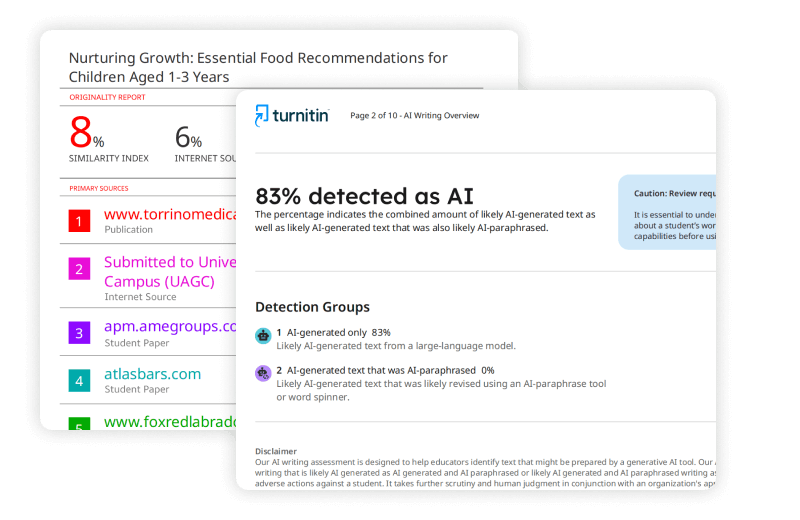
SUMMARY: Turnitin processes submitted documents by scanning text against a database of internet pages, academic journals, and previously submitted student papers. Common status messages like “queued” or “pending” indicate normal processing stages, with most reports generating within an hour under standard conditions.

Check your essay before you submit. See exactly what your professor sees.
Get the exact same Turnitin report your professor uses. Join 50,000+ students who submitted their essays with confidence this semester.
Factors such as large file sizes, non-selectable text, and high submission traffic can extend processing time. A built-in 24-hour delay applies after a fourth revision submission, and a separate AI detection tool evaluates writing patterns in documents exceeding 300 words.
Getting Help with Your Turnitin Submission
Submitting an essay right before a tight deadline brings enough anxiety on its own. When you upload your document and see a spinning wheel or a strange status message, that anxiety doubles. This Turnitin Student Help guide will help you understand what happens behind the scenes during a Turnitin check. You will find clear explanations for common errors, system delays, and status messages, giving you the clarity you need to handle your assignments without panic. Understanding how the system treats your files will prevent unnecessary stress when deadlines approach.
Understanding the Turnitin Check and Processing Times
When you click upload, your file goes through an automatic review. This Turnitin scan analyzes your text line by line to map out matches across a massive database. Normally, a standard submission generates an assessment within fifteen minutes. However, high-volume periods like midterms or finals can plug up the system. It is helpful to know what the different statuses mean so you do not spend hours staring at a static screen.
Turnitin Status Queued: How Long Does It Take?
If you see your paper listed as Turnitin in status queued, it means the software has not actually received or started processing your file yet. This situation happens most often when you upload through a Learning Management System like Canvas, Moodle, or Blackboard. The university platform holds the file before sending it to the grading database.
So, Turnitin status queued how long can you expect to wait? In most cases, it takes anywhere from ten minutes to an hour. The primary cause for this delay involves the background script of your university platform, which pushes files to the external servers in batches. If your paper stays in this position for over two hours, the institutional server might have a backlog, or the connection dropped temporarily. You do not need to panic immediately; give it a little time to clear the server bottleneck.
Turnitin Report Pending Meaning
Another common message is the pending tag. What is the Turnitin report pending meaning for a student? This alert tells you that the file successfully reached the main servers, but the algorithms are still evaluating the text. The software is currently pulling text strings, comparing data, and building the visual overview for your instructor.
If you ask yourself, “Will it eventually Generate a Report?”, the answer is yes. The text is in the processing pipeline, so you do not need to resubmit the document immediately. Re-uploading the file can actually break the current queue line and push your file to the very back of the line. This resets your wait time completely.
Why Is Turnitin Processing So Long?
When a paper gets stuck for hours, you naturally wonder why Turnitin processing so long. Several technical variables influence this speed. The most common reasons involve the properties of the document itself rather than a system failure.
- File Size and Formatting: Documents approaching the 100 MB limit require more time to parse. If your paper contains dense high-resolution images, the text extraction tool struggles to separate words from background visuals.
- Non-Selectable Text: Uploading a PDF that is essentially a collection of scanned images means the system must apply optical character recognition. This slows down the scanner significantly.
- Improper Document Themes: Specific presentation themes or complex visual styles make text unselectable, causing processing errors.
- High System Traffic: When thousands of students submit papers at 11:59 PM on a Sunday, the server networks slow down under the collective load.
The Turnitin 24-Hour Wait Explained
If this is your first draft, the system delivers an analysis quickly. But things change when you make revisions. The Turnitin 24 hour wait is a built-in rule designed to maintain academic integrity and system stability. The software allows you to receive instant feedback for your first three submissions on a standard assignment. Once you upload a fourth version, the system enforces an automatic twenty-four hour delay before it will provide a new Turnitin originality check report.
This rule exists for a practical reason. It stops students from changing two or three words at a time and repeatedly running scans to game the system. Additionally, this window allows the system to clear out temporary files so that your new draft does not match against your previous upload within the same inbox. Keep this time constraint in mind when managing your editing schedule before a major deadline. If you submit a revised draft at the last second, your instructor might see a pending status instead of a completed percentage.
How Turnitin Scans and Compares Your Writing
The primary function of the platform is matching text strings against existing content. This brings up an important question regarding institutional databases: does Turnitin compare student submissions?
File Comparisons and Database Matching
Yes, the system compares every new document against millions of previously submitted student papers. When you upload an essay, it is checked against three main categories of content: current and archived internet pages, premium commercial journals, and the global repository of student papers submitted by institutions globally.
Because it does Turnitin compare student submissions across different schools and years, copying work from a friend or a past student will trigger an immediate flag. This repository comparison happens automatically unless your instructor turned off the storage setting for that specific assignment. The software remembers everything that has entered its system, meaning older assignments from past semesters remain active matches.
Reading Your Turnitin Originality Report
Once the system finishes processing, you get access to the Turnitin originality report. This document highlights matching text segments and gives an overall similarity percentage. Interpreting this score correctly keeps you out of trouble.
| Similarity Percentage | General Meaning | Action Required |
| 0% to 15% | Standard overlap; typical for common phrases or correctly cited references. | Review individual matches to confirm citations are accurate. |
| 16% to 50% | Moderate overlap; potential over-reliance on quoted material or paraphrasing issues. | Rewrite flagged sections in your own words; reduce direct quotes. |
| 51% and above | High overlap; major portions match existing texts or student submissions. | High risk of plagiarism; require extensive rewriting and proper citation checks. |
A high percentage does not automatically mean you plagiarized. It simply means the software found identical word sequences. If you included a long bibliography or used a standard cover page template, those elements will inflate the score. Your instructor will look at the specific highlighted text blocks, not just the raw number, to make a final judgment.
Deciphering Turnitin AI Detection
In recent years, the platform added tools to identify automated writing. The Turnitin AI detection model works separately from the standard similarity scanner. While the similarity check looks for identical text matches, the AI detector looks for patterns in how sentences are put together. Large language models write text based on statistical probabilities, leading to highly predictable patterns. The software analyzes these patterns to determine if a human or a machine created the content.
There are strict rules regarding when this detector operates:
- Word Count Minimums: The document must contain at least 300 words of continuous prose. Short answers or bulleted lists will not trigger the AI check.
- Supported Languages: Currently, this specific scanner primarily evaluates English documents, though support for other languages is slowly expanding.
- File Integrity: The text must be fully selectable. Scanned images or papers with hidden characters will bypass the tool or cause a total processing failure.
If you use AI assistance to generate your outlines or draft whole sections, the detector will likely highlight those passages. Keep in mind that false positives can happen, especially if your writing style is highly formal or structured. If your instructor questions your work based on this score, you should show your version history in Google Docs or Microsoft Word to prove your authentic writing process.
Practical Fixes for Common Turnitin Problems
When you are dealing with submission issues, try these immediate troubleshooting steps to resolve the problem:
- Convert the Document: If your file is getting stuck in a processing loop, save it as a clean PDF using Microsoft Word or Google Docs. This flattens complex formatting and makes the text easier for the scanner to read.
- Remove Password Restrictions: The system cannot open protected files. Turn off all security permissions before uploading.
- Check the Images: Replace large vector images with standard JPEG or PNG files to reduce the overall data weight.
Official Turnitin Documentation:
For a comprehensive list of reasons why a report may be delayed, refer to the official support guides:
I have submitted an incorrect paper to my assignment
Understanding how the system processes text helps you plan your academic submissions better. Avoid uploading at the very last minute, respect the 24-hour cooling period for revisions, and write your papers authentically to avoid flags from the automated safety systems.
Worried about plagiarism scores or AI detection flags? Get the exact same plagiarism & AI report your professor sees in 15-20 minutes. Trusted by thousands of students, researchers, institutions, and agencies.